
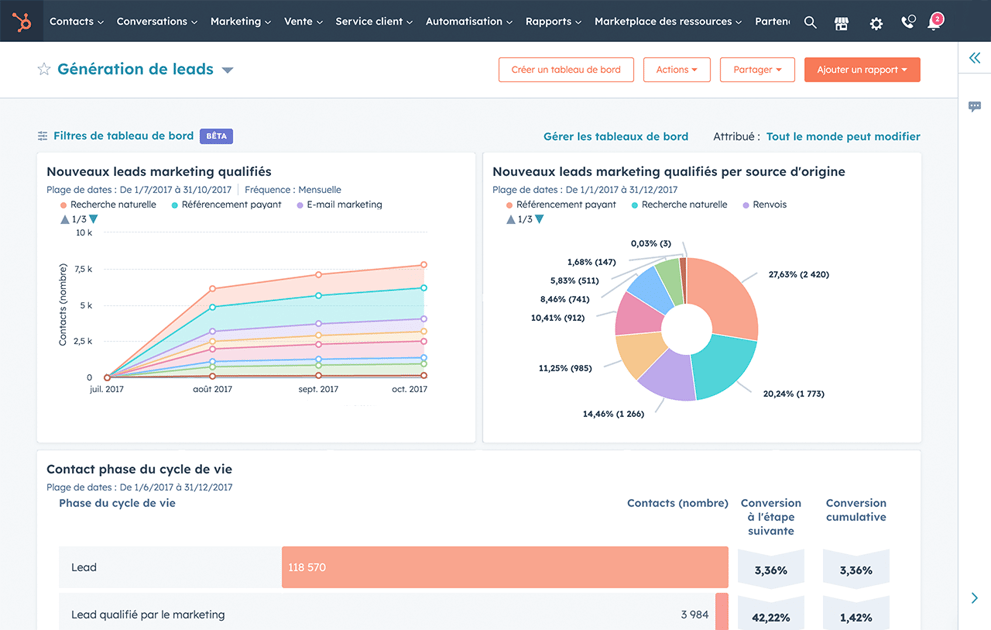
Why HubSpot Reporting Is Evolving in 2026
2026 marks a turning point: companies can no longer settle for "cosmetic" reporting. CEOs, CFOs, and RevOps teams now expect:
A unified revenue vision across all teams A realistic forecast powered by artificial intelligence A clear reading of the sales pipeline Reliable data to make better decisions Actionable insights that deliver results
AI engines integrated into HubSpot make dashboards smarter... but only with good structure. Without data quality: garbage in → garbage out.
This reporting software transforms your ability to track performance, analyze data, and optimize your marketing and sales strategy. HubSpot can help you centralize all your data into one place.
The Limitations of Classic B2B Dashboards
Many companies accumulate 20, 30, sometimes 50 dashboards → nobody consults them. Instead, you need essential dashboards that help track critical KPIs and prioritize actions.
If pipelines are inconsistent, reporting becomes useless. HubSpot reporting tools cannot create insights with corrupted data. The CRM platform requires clean data.
Marketing dashboards focus on leads; sales on deals → but nobody has a vision of final revenue. Reporting must unite all teams around revenue and the customer journey.
Which HubSpot Reports Are Available: The 7 Essential Dashboards
1. Revenue Overview Dashboard 2026
Objective: manage revenue in real time. Includes revenue earned vs target, MRR/ARR, at-risk opportunities, AI-powered forecast, and revenue attribution by channel. This dashboard is one of the most critical for marketing and sales teams.
2. Pipeline Health Dashboard
Measures pipeline health to identify bottlenecks: deals distribution by stage, velocity, aging, AI anomalies. These HubSpot reports enable tracking evolution and improving conversion rates.
3. Marketing → Sales Handoff Dashboard
Critical for alignment: accepted MQLs, rejected MQLs and reasons, respected SLAs, MQL → SQL → Deal conversion rate. These reporting tools help optimize collaboration between marketing and sales teams.
4. Sales Performance Dashboard
Individual and collective tracking: quota achieved, closing rate, win rate by customer segment, sales cycle duration, forecast per salesperson. This HubSpot dashboard enables tracking sales team performance.
5. Attribution & Marketing ROI Dashboard
To understand what generates revenue: influential campaigns, first touch / last touch revenue attribution, multi-channel attribution, CAC per channel, ROI per campaign. These reporting tools transform your marketing reporting.
6. Customer Success Dashboard
Essential to reduce churn: NPS, open/closed tickets, churn MRR, upsell / cross-sell, customer health (AI score). This dashboard connects customer service with your revenue objectives throughout their customer journey.
7. Data Quality & Governance Dashboard
New 2026 priority: duplicates in your contacts, missing properties, detected anomalies, completion rate. These reporting tools are essential to ensure your analytics are reliable.
How to Create a HubSpot Dashboard: Practical Guide
In your HubSpot account, go to Reporting > Dashboards. HubSpot reporting tools offer an intuitive interface to create customized dashboards. This customer platform centralizes all your information.
Click "Create Dashboard" to begin. You can build your dashboard with pre-built reports or custom analytics.
How to create an effective dashboard: define your essential KPIs, select relevant reports, organize logically, share with your teams. HubSpot CRM transforms your data into actionable insights.
HubSpot offers hundreds of ready-to-use available reports. You can easily add or customize them according to your marketing and sales needs. This all-in-one platform unifies your data with HubSpot.
Use HubSpot automation features to receive automatic alerts on critical performance. This automation helps your teams work efficiently and scale with reliable data.
How to Use HubSpot Reporting Tools: Best Practices
Standardize Data
Before creating your dashboards, ensure your data is clean. Best practices include: mandatory properties, consistent nomenclature, standardized pipelines, data governance. HubSpot management software ensures quality.
Unify Marketing and Sales
Reporting in HubSpot must unite all revenue teams. Create dashboards that show the complete customer journey, from lead to customer. HubSpot unites your marketing, sales, and service teams.
Use AI for Insights
HubSpot powered by artificial intelligence can generate automatic insights: close rate prediction, data anomaly detection, recommendations to optimize marketing campaigns, alerts on blocked deals. These AI-powered analytics transform your reporting into a strategic tool that delivers results.
Reading Rituals
Establish regular rituals to analyze reports: weekly pipeline review, monthly forecast review, marketing influence review, CS & churn review. Without ritual → even the most powerful reporting is useless.
How to Track Performance with HubSpot: Advanced Analytics
KPIs to track in your dashboards to manage at scale: conversion rate at each customer journey stage, pipeline velocity, customer CAC and LTV, churn rate, revenue per channel. HubSpot reporting helps track all these metrics in real time.
Use HubSpot to analyze and identify: which campaigns generate the most revenue, which customer segments convert best, where friction points are located, how to improve your conversion rates. This data analysis transforms your marketing and sales strategy. Insights help your marketing teams prioritize their actions.
How to Improve Reporting with HubSpot: AI Innovations
Predictive Forecasting
HubSpot estimates closing probability based on: deals history and customer data, customer behavior and journey, pipeline velocity, average value, AI signals. This AI-powered forecasting improves your revenue forecast accuracy.
Anomaly Alerting
HubSpot automatically detects and alerts you about: blocked deals, inconsistent data, abnormal conversions, declining performance, at-risk customers. These alerts help your teams act quickly.
Automatic Insights
Recommendations appear in reports: "Your win rate has been declining in this segment for 30 days". These insights help make data-driven decisions. Integration with social media enables tracking engagement across all channels.
Common Mistakes to Avoid
Basing on a poorly structured pipeline: A bad pipeline = bad reporting.
Using optional properties: Critical fields must be mandatory.
Multiplying dashboards: Better 7 perfectly built dashboards than 40 never consulted.
Separating marketing & sales reporting: 2026 = unified revenue reporting across all teams.
Ignoring customer service: Customer service is crucial for the customer journey.
How to Build Revenue-Oriented Reporting
Phase 1 - Standardization: Properties, nomenclature, pipelines, lifecycle. Essential foundation for reliable analytics.
Phase 2 - Unified Dashboards: Unify marketing, sales, and CS for one common language. Create dashboards that connect all teams.
Phase 3 - Automation & AI: Alerts, scoring, predictive forecast powered by HubSpot. This automation frees your teams and helps scale.
Phase 4 - Rituals: Without regular ritual, even the most powerful reporting is useless. Establish reviews to use your reporting tools effectively.
Conclusion: Reporting as a Strategic Tool
HubSpot reporting in 2026 is no longer a simple dashboard.
It's a true revenue management tool, based on:
Clean governed data in one place Artificial intelligence for powered insights A unified pipeline vision across teams Dashboards designed for decision-making
Organizations adopting these best practices see their capacity improve, their CAC decrease, and their teams aligned.
HubSpot reporting tools help create a complete customer platform where all information is available in real time. This analytics software transforms your ability to track, analyze, and optimize your marketing and sales performance.
HubSpot reporting software becomes your central management software to drive revenue with reliable data. Use HubSpot to connect with your teams, deliver insights, and power your growth at scale in your business.
FAQ
1. How Many Dashboards Are Needed in 2026?
Between 5 and 10 carefully built dashboards are sufficient. Better a few essential dashboards than dozens never consulted by your marketing and sales teams.
2. Is AI Reliable for Forecasting?
Yes, if the data is clean. Artificial intelligence powered by HubSpot helps generate accurate forecasts with clean data in your CRM.
3. Should I Create a Dashboard per Country / BU?
Only if your pipelines differ, otherwise, one global model is sufficient. Use filters to segment according to your business needs.
4. Do HubSpot Dashboards Replace a BI Tool?
No, but for 80% of revenue and analytics needs, HubSpot reporting is largely sufficient. It's a powerful reporting software for small and large companies. The integrated marketing software provides all necessary tools.
👉 Try HubSpot for free: Create your free account
👉 Ready to transform your reporting with HubSpot? Schedule a meeting with our team of experts